Data sharing
Every Connect verification produces an on-chain credential your contract can gate on. Data sharing gives you the layer beneath it: the verified fields the proof disclosed, read from your own backend with a policy-scoped API key.
Use it to:
- Read the data your policy collects. A user proves once, and the verified fields land under your policy. You read them with your own key over the API.
- Enforce your own rules on the proof. A credential is a pass or fail. The shared fields let you act on what the proof actually disclosed, such as country or KYC status, and apply logic the policy itself does not encode.
For example, an app gates access with a Keyring credential, then reads the verified fields behind each proof to apply its own logic, without collecting any documents from users.
The xLend demo shows the full path: a user verifies, and the app reads back the fields its policy collected.
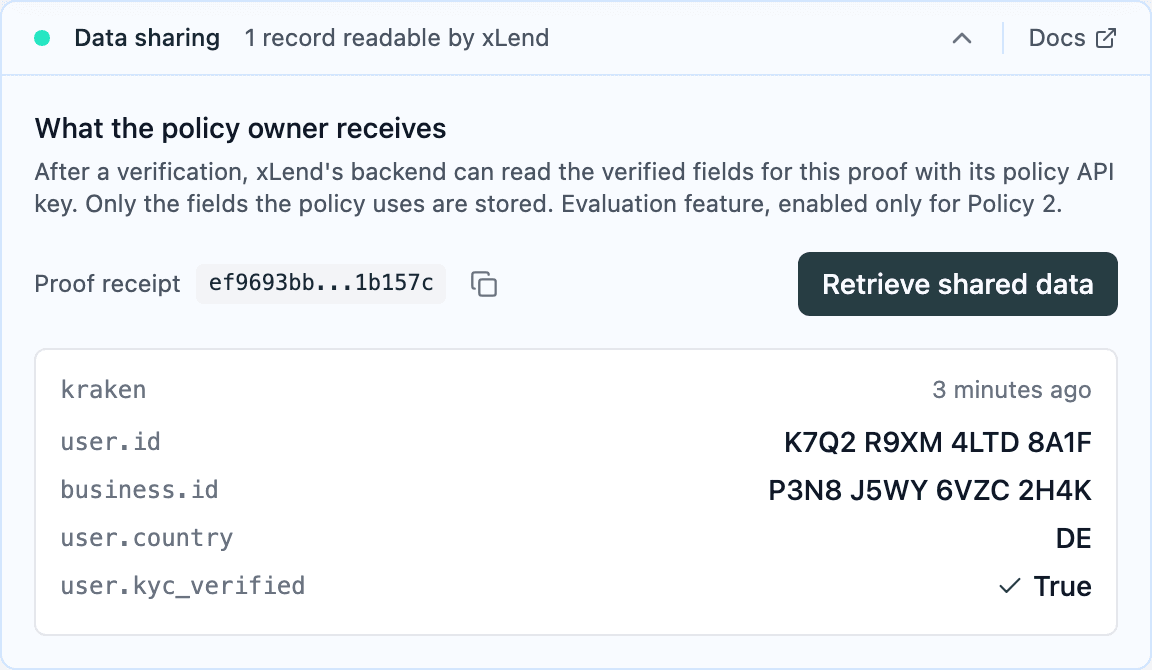
When a user submits a verification for your policy, Keyring checks their data against the datasource and stores the verified fields. Your API key reads your policy’s data and nothing else, and each row holds only the fields your policy uses.
Sources, fields, and claims
The response uses three terms that come from how Keyring models a proof. See Policies and claims for how a policy composes them.
- A datasource is the account the user proves against, such as an
exchange. It exposes many raw fields.
datasource_idnames it. - A field is a canonical value Keyring maps and normalizes from a
datasource, such as
user.kyc_verified. The same field id means the same thing across datasources. These are the keys indata. - A claim is a rule over fields, such as
kyc_verified = true. Your policy requires one claim, and the proof discloses only the fields that claim reads.
This is why the response is bounded by the claim, not by the datasource: the datasource may expose far more than the few fields your policy asked for.
This is the credential-gated path. The same canonical fields can stand on their own, so a datasource’s verified data reaches your backend without a claim or an on-chain credential. This runs as a custom configuration for your policy. Ask Keyring support to set it up.
Getting started
1. Prerequisites
- The Keyring Connect SDK integrated for credential verification.
- Your Keyring backend policy ID.
- A policy-scoped API key. Contact Keyring support for provisioning; third-party integrators need a key for the policy they integrate.
Call the API from your backend only. Keep the key in a secret manager, never in browser code or public repositories. If you show this information to users, ensure authorised access.
2. Read the proof data
After verification, read proofData from the SDK’s extension state:
const state = await KeyringConnect.getExtensionState();
const proofData = state?.proofData;
proofData contains nonce, policyId, and entityId. The nonce identifies
that proof submission, even if not all policy claims passed. You can also read
it through subscribeToExtensionState.
3. Retrieve the verification data
Use proofData.nonce as NONCE and proofData.policyId as POLICY_ID to
query Keyring’s API. Your key must be provisioned for that policy:
curl -X POST "https://main.api.keyring.network/api/v1/policies/${POLICY_ID}/proof-data/query" \
  -H "X-API-Key: $KEYRING_API_KEY" \
  -H "Content-Type: application/json" \
  --data "{\"nonce\":\"$NONCE\"}"
The response holds the record for that proof:
{
  "count": 1,
  "next": null,
  "previous": null,
  "results": [
    {
      "datasource_id": "example-source",
      "data": {
        "user.country": "DE",
        "user.kyc_verified": true
      },
      "created_at": "2026-08-27T09:14:03.512Z"
    }
  ]
}
Each new proof has a different nonce. An older nonce still retrieves its original proof. The API reference below covers every field.
4. Query records by time
To fetch records newer than a timestamp, send created_after:
curl -X POST "https://main.api.keyring.network/api/v1/policies/${POLICY_ID}/proof-data/query" \
  -H "X-API-Key: $KEYRING_API_KEY" \
  -H "Content-Type: application/json" \
  --data '{"created_after":"2026-08-27T09:14:03.512Z"}'
Use created_after to fetch records newer than a timestamp, or send an
empty object to read all records, one page at a time.
Implement with AI
Paste this into your coding assistant to scaffold the backend route. Fill in your app name and policy ID:
You are integrating Keyring Connect data sharing into <my app>'s backend.

Context:
- After a user verifies, the browser SDK exposes state.proofData, which holds
  { nonce, policyId, entityId }.
- My backend holds a policy-scoped API key in an env var, KEYRING_API_KEY.
- Endpoint: POST https://main.api.keyring.network/api/v1/policies/<POLICY_ID>/proof-data/query
- Auth header: X-API-Key. JSON body: {"nonce": "<nonce>"} for a single proof.
- Newest-first records come back under "results".

Task:
- Add a backend route that takes a nonce from my authenticated frontend, calls
  the endpoint with the server-held key, and returns the results.
- Never expose the API key to the browser.
- Authorise the authenticated caller's access to the requested proof.
API reference
Request
POST https://main.api.keyring.network/api/v1/policies/{policy_id}/proof-data/query
X-API-Key: <your key>
Content-Type: application/json
All filters and pagination fields go in the JSON body.
| Body field | Purpose |
|---|---|
nonce | One proof submission. 64 lowercase hex characters; send alone. |
created_after | Records strictly newer than an ISO-8601 timestamp. |
page | Page number. Defaults to 1. |
page_size | Records per page, from 1 to 100. Defaults to 100. |
Response
Records are returned newest first. Each row is one proof.
{
  "count": 1,
  "next": null,
  "previous": null,
  "results": [
    {
      "datasource_id": "example-source",
      "data": {
        "user.country": "DE",
        "user.kyc_verified": true
      },
      "created_at": "2026-08-27T09:14:03.512Z"
    }
  ]
}
Top-level count is the total number of matching records. next and
previous are page numbers or null. To continue, repeat the request with the
same filters and page size, setting page to next.
Each record in results:
| Field | Meaning |
|---|---|
datasource_id | The source the fields were proved against, such as an exchange. |
data | Verified field_id: value pairs used by your policy’s claim. Can be empty. |
created_at | When the proof was recorded, as an ISO-8601 timestamp. |
The data fields are not a fixed set. A proof is built over a predefined
subset of what the datasource exposes, and the response is held to the fields
your policy’s claim reads. The claim can be configured to disclose more,
up to what the datasource provides. To receive additional fields, extend the
policy’s claim.
Errors
| Status | Meaning |
|---|---|
| 400 | Invalid nonce, or nonce combined with other fields. |
| 401 | Missing or invalid API key. |
| 403 | Key not authorised for the policy or query. |
| 404 | Policy or proof not found, or data sharing not enabled. |
| 422 | Invalid request body or pagination. |
| 429 | Rate limit exceeded. Back off before retrying. |
The API allows 60 queries per minute per key.